
Lab assignment 6 - Netscrape
In the last lab assignment of the course you are to write an improved version of Netscape, that not only shows web pages but also makes a table of all links on the page. The result might look like this:
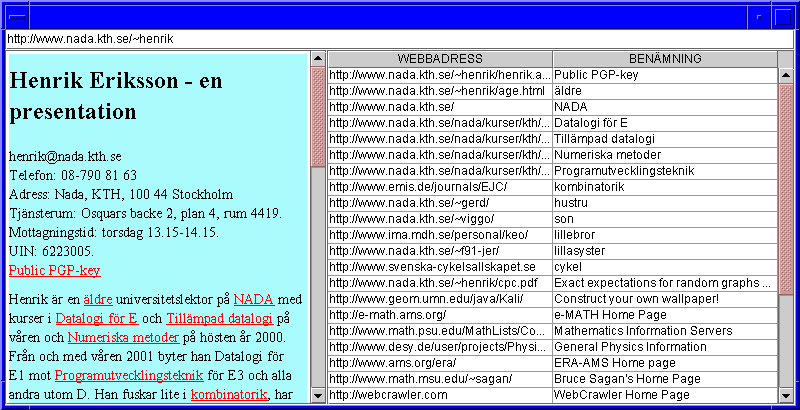
Three advanced swing components should be used: JEditorPane, JScrollPane and JTable. Also, the swing class HTML that parses web pages will play a major role.
These are the imports you'll probably use.
   import java.io.*;
   import java.awt.*;
   import java.awt.event.*;
   import java.net.*;
   import javax.swing.*;
   import javax.swing.event.*;
   import javax.swing.text.html.*;
   import javax.swing.text.*;
The graphical interface
When writing a graphical program that is not trivially small, it's often a good idea to start with a prototype, i.e. a program that looks like the complete program but lacks most of the functionality. In this case the prototype should show a JFrame with three components: a text field at the top (position NORTH), a JEditorPane in the center and a JTable to the right (EAST), all without contents. The table should have 50 lines and two columns, so it will not fit in the window. Put the table inside a scrolling box, for instance with the following code:
JScrollPane links=new JScrollPane(new JTable(50,2));It's also best to place the web browser (the center component) in a scroll pane as well, since the entire page will be too large for the window.
Run the program and check that it's possible to write text in all three
components. This is an accidental feature (or bug?) as far as the web
page and link table components are concerned. TextFields are frequently
used for input so they are expected to be editable.
The user enters the web address to go to in the TextField. When the user presses Enter, the ActionListener for the text field is triggered. It's possible to let the Netscrape class itself be an ActionListener and make a call like
browser.showPage(...) when the ActionEvent takes place.
The web browser
Your task is now to write a class WebBrowser which extends JEditorPane and has a method showPage(address). This method actually only needs the single statement setPage(new URL(address));
but the compiler requires this to be wrapped in a try-catch to handle the cases when the page cannot be found etc.
When this happens, the user should be alerted of the error by a dialog box. This component is called JOptionPane. Look up its usage in the Java documentation (hint: the first parameter should be this).
When the class is ready, Netscrape can do WebBrowser browser = new WebBrowser();.
The surfer - extra assignment
When you try your web browser out you will be annoyed by the fact that the browser does nothing when you click the links. This is not necessary to fix to pass the lab assignment, but counts as an extra assignment. Two things must be done: you have to call setEditable(false) so that
your browser does not interpret the click as a "start editing"-action.
Also, you need to add a HyperlinkListener. The details of this areshown in the web summary of lecture 10.
The call getURL().toString() for a HyperlinkEvent returns a web address which can be used in the address bar.
So, write a class Surfer which inherits from WebBrowser and takes (and saves) a reference to the address bar as a parameter in its constructor. Just writing the address to the address bar is not enough, however. You also need to generate an event by callin postActionEvent() for the address bar. When the class is ready, Netscrape can do WebBrowser browser = new Surfer(addressBar);
The link table
Leave the Netscrape class for a while and write a new program that outputs all links from a web page. It can be called WebCheck and consist of, at least for now, just a main-method. A web page can be printed with the following code
   String webbsida="http://www.nada.kth.se/~henrik";
   InputStream in=new URL(webbsida).openConnection().getInputStream();
   InputStreamReader reader= new InputStreamReader(in);
   while(reader.ready()) System.out.print((char)reader.read());
The compiler requires a
try-catch since the connection might fail. Instead of reading the input stream, you can create an empty HTMLDocument and let a HTMLEditorKit read the web page into it by
   doc.putProperty("IgnoreCharsetDirective", Boolean.TRUE);
   new HTMLEditorKit().read(reader,doc,0);
(Without the first statement you'll get a ChangedCharSetException on all swedish sites that explicitly state the character set as iso-8859-1.)
An HTML page consists of different kinds of tags. The tag used for
links is called A and has an attribute HREF
which has the web address of the link as value. Your task is to iterate
through the document from A-tag to A-tag, read the HREF attribute and
print its value. To do this, create a Tag.A iterator and a HREF attribute
object. Use a while loop to iterate through the A-tags.
For each A-tag, print the HREF-attribute.
When this works, change the program to also output the text between the A-tag and its closing tag by using it.getStartOffset() and it.getEndOffset().
Instead of printing links and link text, WebCheck should now add them in a JTable, which can be retrieved by Netscrape with the call
links=new JScrollPane(WebbCheck.linkTable(addressBar.getText()));Now, your code should be moved from the
main method to a method
linkTable() which returns a JTable.
To begin with, put the links and link texts into a
50x2 String matrix and after that create a JTable
from the matrix and a two-element caption vector. Also, give the background
a nice color before returning the JTable.
While you are testing the program, it might be a good idea to have a
main
method in WebCheck that calls linkTable,
puts the table in a JFrame and
shows it. Once this works, you can be sure that Netscrape too will show
the table properly.
The last problem to solve is how to get rid of the old table before
adding a new one when a new URL is requested. One way is to first
call remove(links),
and then create a new JScrollPane links before adding it in
the right part of the browser as before.
Finally, you can go web smurfing among the links to celebrate that the last prutt assignment is completed.